Sponsored

How to remove the Apple/Google maps guidance that shows on the dash

Major Ram

Senior Member
First Name
Arjun
Joined
Mar 13, 2025
Threads
14
Messages
66
Reaction score
26
Location
Washington DC
Vehicle(s)
Civic Type R 2024
Hi All,
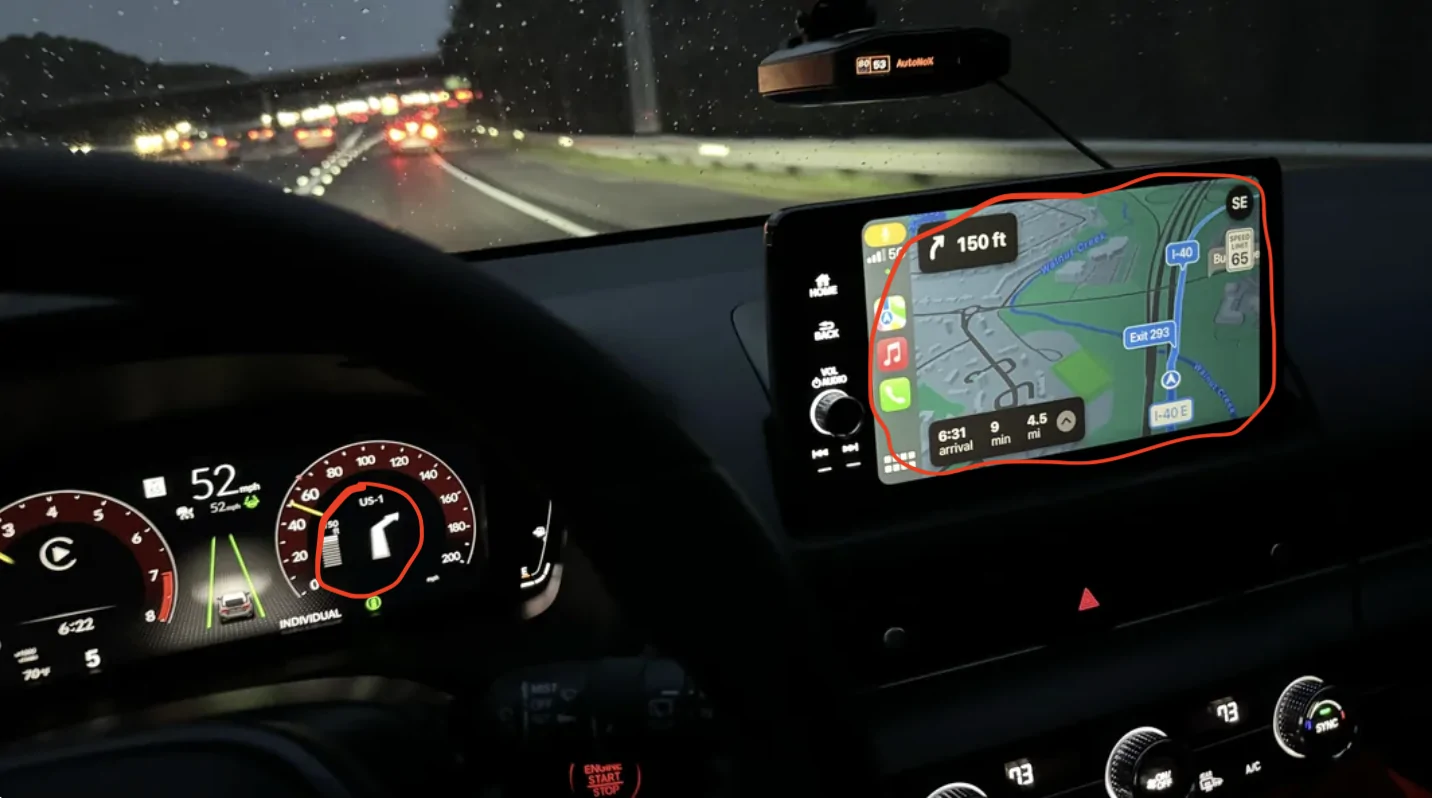
I have been bothered for quite some time about the turn by turn maps directions additional guidance that shows on the dashboard whenever I have the phone wired(carplay) into the infotainment with google maps active. I believe that I accidentally updated the infotainment around August 2025 and since then it has been happening.
Any one else facing this and how to resolve it?
It also shows on the Type R mode cluster. Is there a way to remove it, so as to show the miles, distance to empty, etc metrics while using the Type R mode.
Any help will be appreciated.

Pic for reference from a reddit thread:
11th Gen Honda Civic How to remove the Apple/Google maps guidance that shows on the dash 1769564495768-77
Sponsored

 
Last edited:

CafeApex

Senior Member
Joined
Sep 16, 2025
Threads
1
Messages
84
Reaction score
97
Location
AZ
Vehicle(s)
2025 BB FL5
You aren't able to just cycle through different pages with the scroll button? It shouldn't just be stuck on the navigation one.
 
OP
OP

Major Ram

Senior Member
First Name
Arjun
Joined
Mar 13, 2025
Threads
14
Messages
66
Reaction score
26
Location
Washington DC
Vehicle(s)
Civic Type R 2024
You aren't able to just cycle through different pages with the scroll button? It shouldn't just be stuck on the navigation one.
I am able to cycle through different views(for e.g. if I want to keep the miles view) but the map guidance comes back on as soon as it is about to give next set of directions!
Is there a way to go back to the earlier infotainment update.


CafeApex

Senior Member
Joined
Sep 16, 2025
Threads
1
Messages
84
Reaction score
97
Location
AZ
Vehicle(s)
2025 BB FL5
I am able to cycle through different views(for e.g. if I want to keep the miles view) but the map guidance comes back on as soon as it is about to give next set of directions!
Is there a way to go back to the earlier infotainment update.
I think you might want to check with Honda, it shouldn't be getting stuck on that screen, don't think it's an update thing. Are you using a new, good cable?
 
OP
OP

Major Ram

Senior Member
First Name
Arjun
Joined
Mar 13, 2025
Threads
14
Messages
66
Reaction score
26
Location
Washington DC
Vehicle(s)
Civic Type R 2024
Yes the cable is legit, I've been using it since 1 year. I didnt get those turn by turn directions guidance before. It also happens with wireless carplay.
Would ideally avoid going to the stealership for this.
 

dcampos83

New Member
First Name
Doug
Joined
Mar 21, 2024
Threads
0
Messages
1
Reaction score
1
Location
Rogers, Ar
Vehicle(s)
94 Civic Vx, 24 Civic Type R
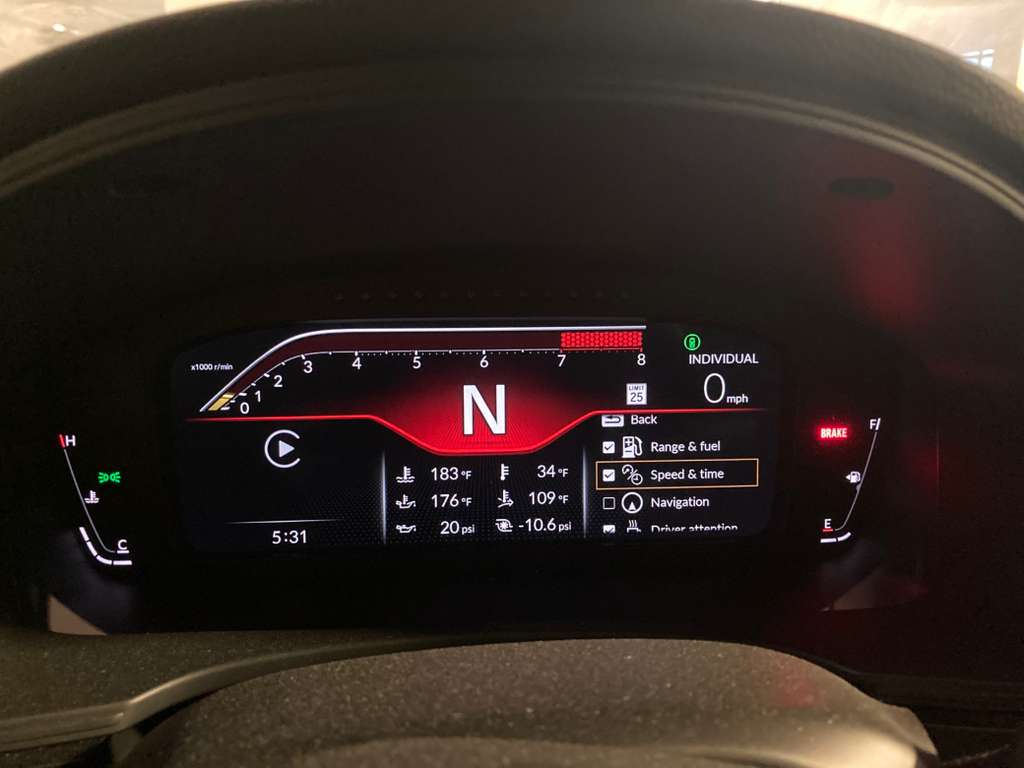
In the menu to customize display *where it gives you options what to show, there should be a box to unclick navigation. It wont show it after deselecting it
 

ctechauto

Elite Sponsor
Joined
Apr 4, 2025
Threads
13
Messages
438
Reaction score
766
Location
Texas
Vehicle(s)
.
Use Waze. It doesn't show up in the cluster.
I use Waze with android auto. It definitely shows the turn by turn on the cluster (also regardless of drive/cluster mode).

OP - you can choose to unselect the navigation in the custom cluster settings with the roller wheel on the steering button
 

Blindeye_03

Senior Member
Joined
Jan 23, 2016
Threads
14
Messages
381
Reaction score
70
Location
Cincinnati Ohio
Vehicle(s)
'24 CTR - red
probably in a manual somewhere on how to do it or just mess with the settings but yes you can hide it for good if you never want to see it again.


derbo904

Keeper of Blinky lights
Joined
Dec 2, 2016
Threads
6
Messages
287
Reaction score
50
Location
Bay Area, CA
Vehicle(s)
23 FL5
I believe this was change in Google end for your account. My turn-by-turn directions in the HUD was not active for Google Maps on both my wife's M4 and Civic until about Aug 2025 as well.


Google maps needs an option to turn that feature off in the iOS app. Feels redundant to show directions on two different screens.
 
OP
OP

Major Ram

Senior Member
First Name
Arjun
Joined
Mar 13, 2025
Threads
14
Messages
66
Reaction score
26
Location
Washington DC
Vehicle(s)
Civic Type R 2024
In the menu to customize display *where it gives you options what to show, there should be a box to unclick navigation. It wont show it after deselecting it
Will definitely try this out and report back!
I had couple of months ago, tried scrolling around the menu in the dashboard cluster but was not able to find the option to uncheck navigation.
 

MoodySara

Senior Member
First Name
Paul
Joined
May 5, 2021
Threads
3
Messages
158
Reaction score
140
Location
New England
Vehicle(s)
2025 Honda Civic Type R; 2024 Honda Civic Touring
Take a look at Navigation > Guidance Options.
There may be something there that does what you need.
 
OP
OP

Major Ram

Senior Member
First Name
Arjun
Joined
Mar 13, 2025
Threads
14
Messages
66
Reaction score
26
Location
Washington DC
Vehicle(s)
Civic Type R 2024
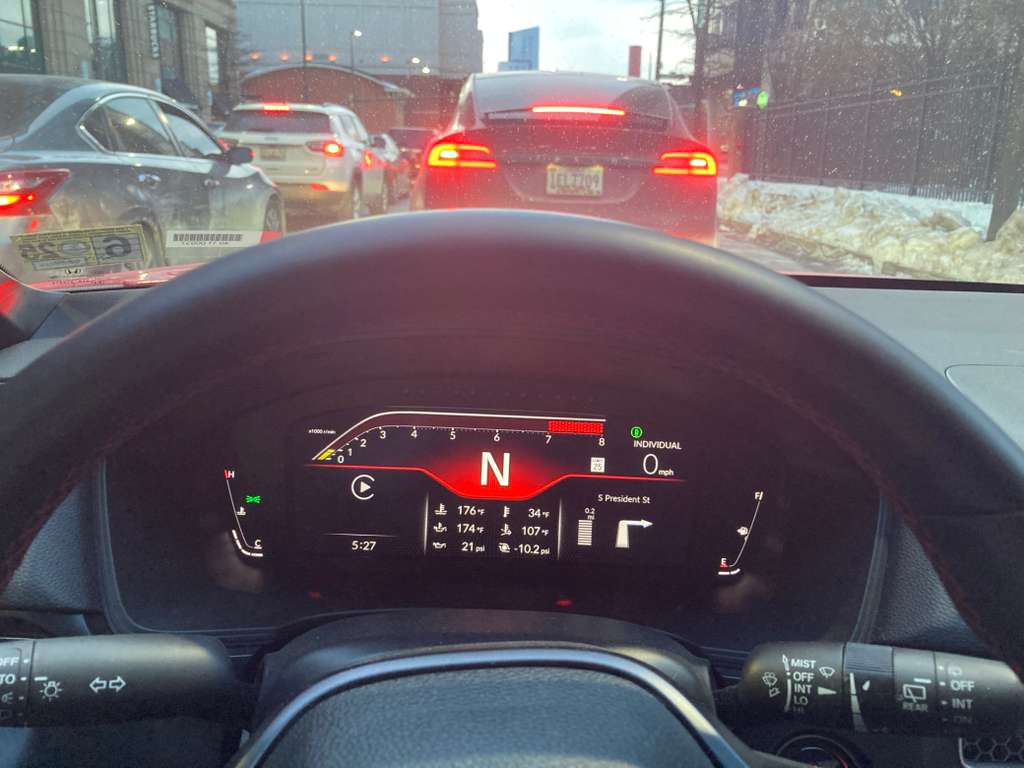
Tried all the options suggested above(attached pics) but it didnt work. am I missing something or is there no way to turn off the turn by turn navigation?
11th Gen Honda Civic How to remove the Apple/Google maps guidance that shows on the dash map1
11th Gen Honda Civic How to remove the Apple/Google maps guidance that shows on the dash map2
 

Blindeye_03

Senior Member
Joined
Jan 23, 2016
Threads
14
Messages
381
Reaction score
70
Location
Cincinnati Ohio
Vehicle(s)
'24 CTR - red
When it displays, can you use the roller thing on the right side of the steering wheel so that you dont have to view the turn by turn? Thats weird that it isnt selected and still displaying..
Sponsored


Top